Visitor Management System
A web-based platform for secure, real-time visitor tracking across multi-tenant government and corporate facilities.
Visitor Management System
A web-based platform for secure, real-time visitor tracking across multi-tenant government and corporate facilities.
Visitor Management System
A web-based platform for secure, real-time visitor tracking across multi-tenant government and corporate facilities.
Year
2025
Year
2025
Client
GX Informatics
Client
GX Informatics
Project type
GovTech · Product Design
Project type
GovTech · Product Design
Overview
Project Description

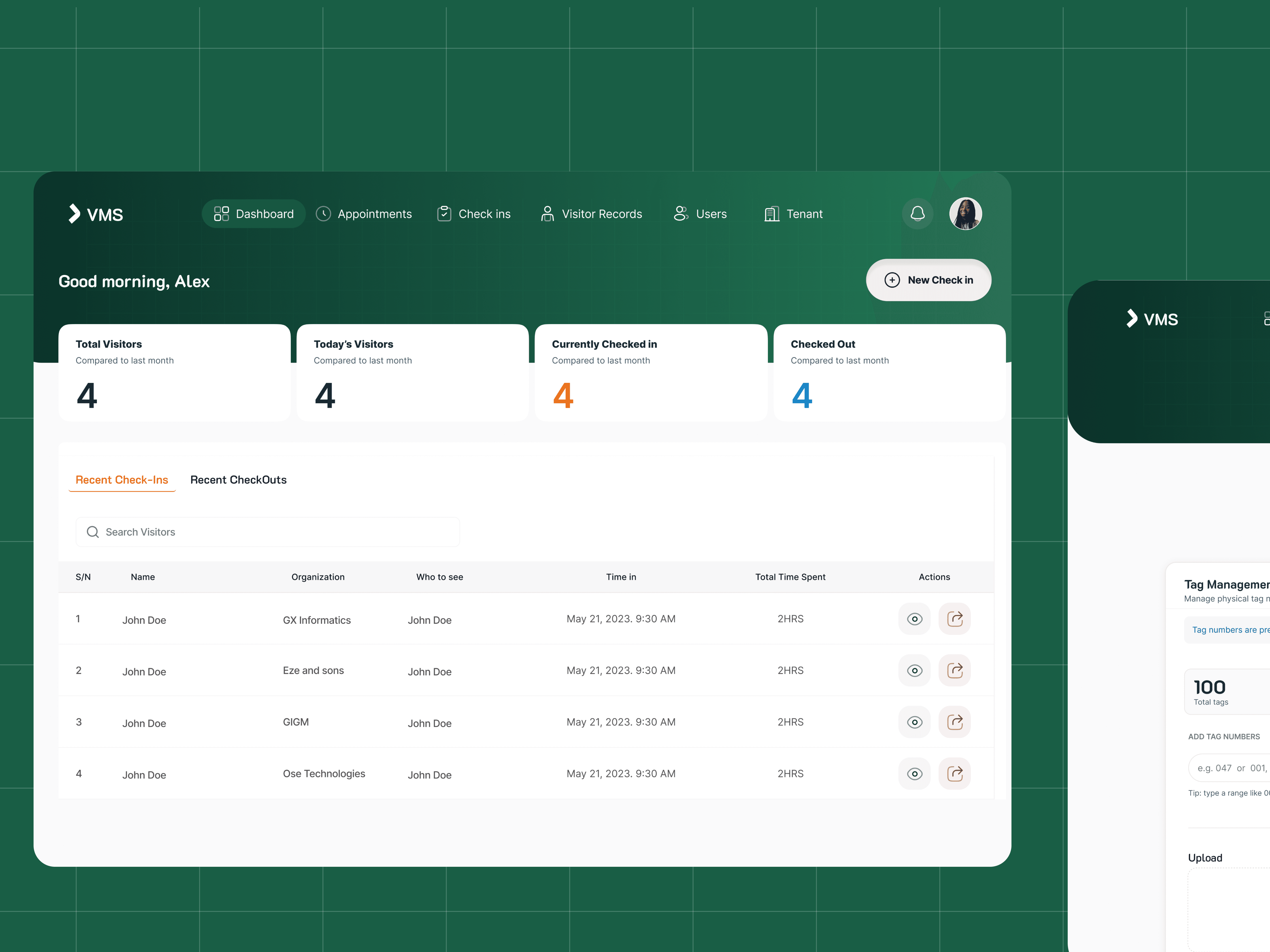
The Visitor Management System (VMS) is a web-based platform designed for facilities to track, manage, and audit visitor access. It handles the full visitor lifecycle, from pre-scheduled appointments through physical check-in, to check-out and historical reporting.
The system is designed for security officers, front-desk administrators, and facility managers working in multi-tenant buildings, government offices, and enterprise campuses. It replaces paper logbooks and fragmented spreadsheets with a unified, searchable, real-time platform.
The Problem
Security gaps in physical access
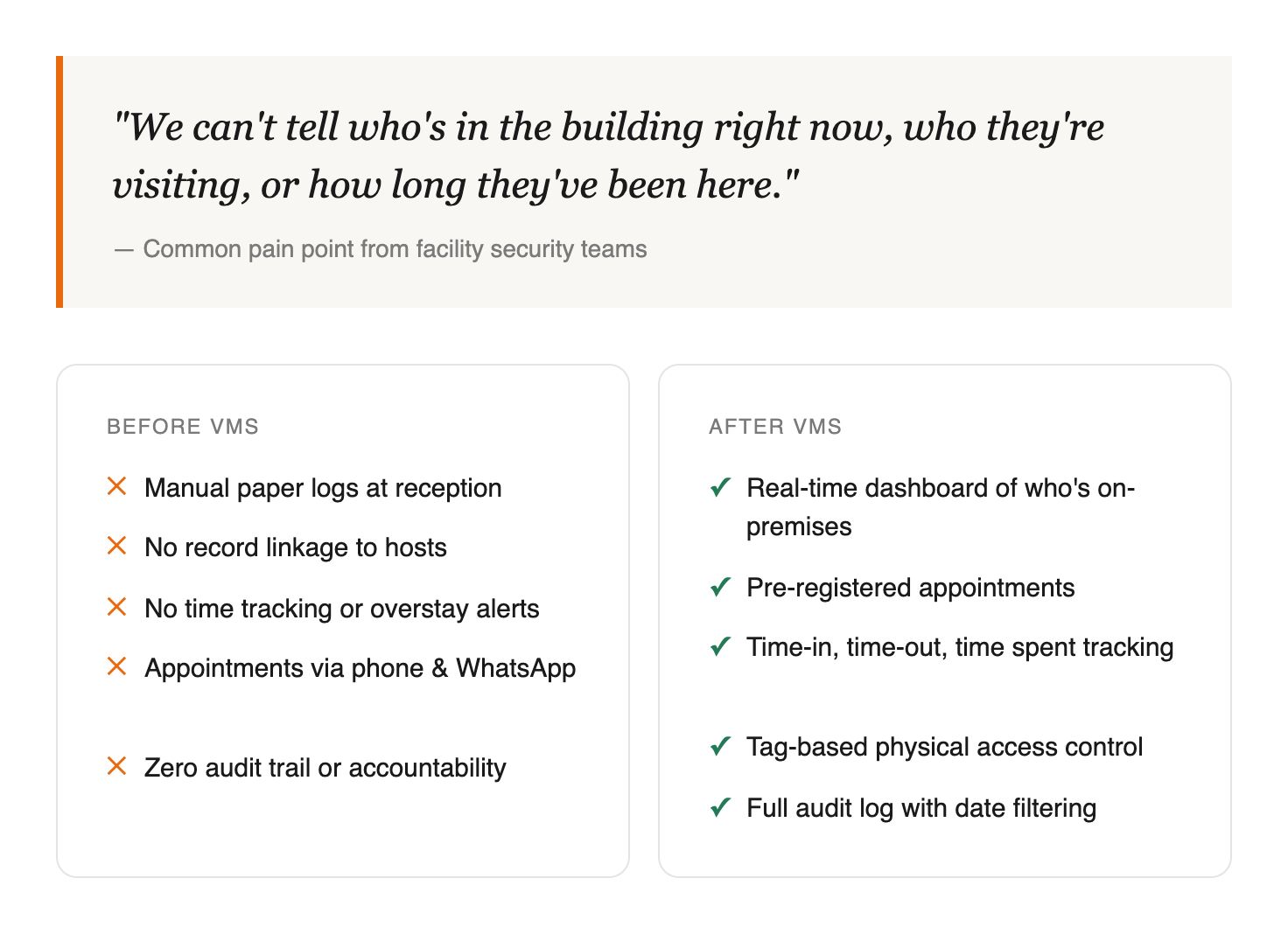
Most facilities in Nigeria's government and corporate sector still rely on paper-based visitor logs. These create compounding problems, illegible entries, no audit trail, no way to verify who is on-premises at any given moment, and zero accountability when something goes wrong.
Before VMS: Manual paper logs at reception. No record linkage to hosts. No time tracking. No way to flag overstays or unauthorized access. Appointment coordination done via phone calls and WhatsApp.
After VMS: Real-time dashboard showing who's checked in, who they're visiting, and how long they've been present. Pre-registered appointments. Tag-based physical access. Full audit log with date filtering.
The Solution
Solution
The VMS is organized around six primary sections: Dashboard, Check Ins, Appointments, Visitor Records, Users, and Tenant management.
Dashboard: Four real-time stat cards (Total Visitors, Today's Visitors, Currently Checked In, Checked Out) with a tabbed table showing Recent Check-Ins and Recent CheckOuts.
Check-In Form: A slide-over panel that layers over the dashboard so the officer never loses context. Captures: phone number, name, organization, address, laptop number (optional), whom to see, purpose of visit, department, office, tag number (auto-filtered by company), and signature. Time-in is auto-stamped, not editable.
Appointments Dashboard: Status-tracked table with four states: Pending (orange), Honoured (blue), Cancelled (red), Completed (green). Stat cards headline the screen with totals for each status.
Visitor Records: Full historical log with time-in, time-out, and time-spent columns. Date range picker and type filter for scoped queries without leaving the screen.
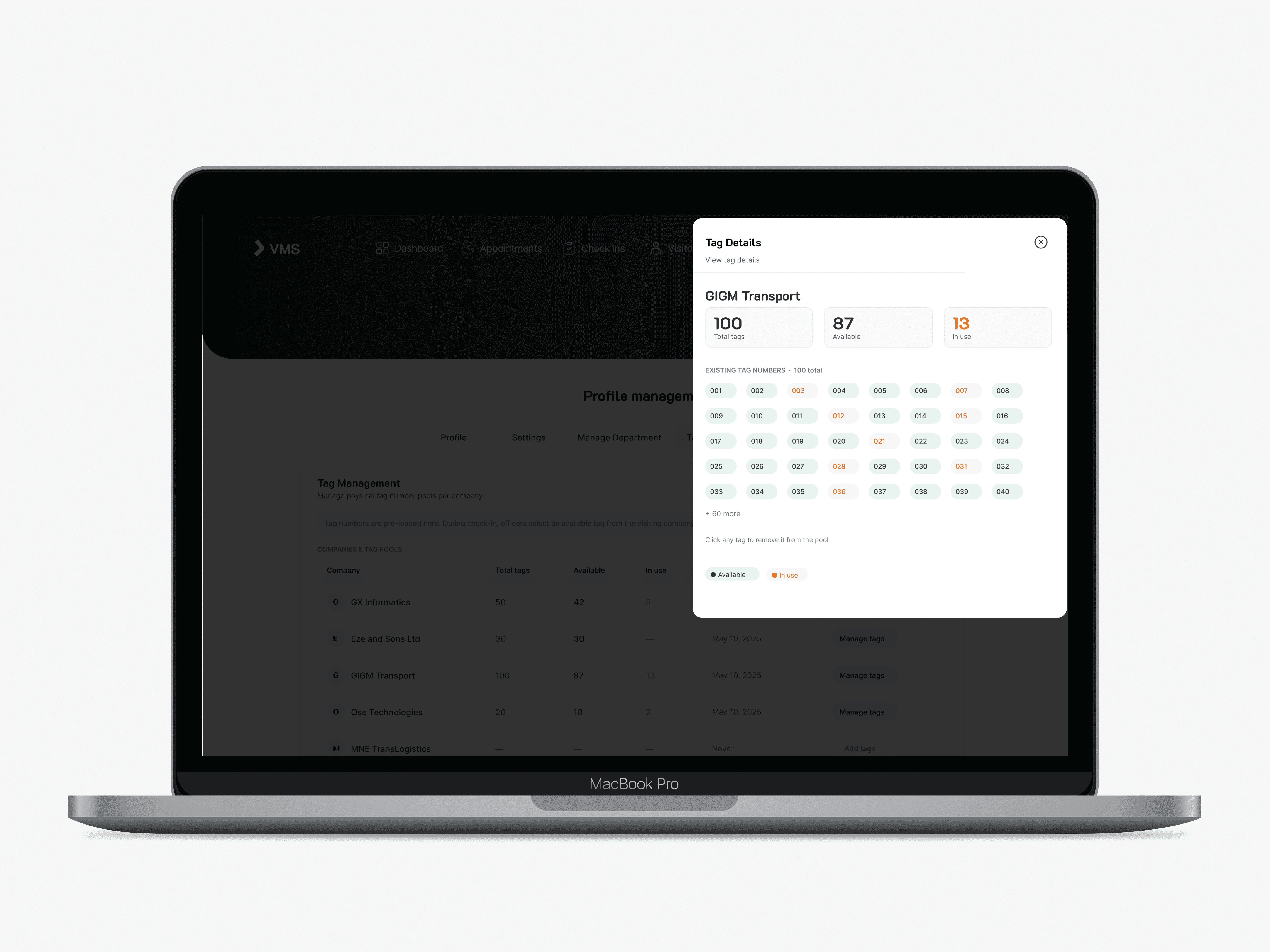
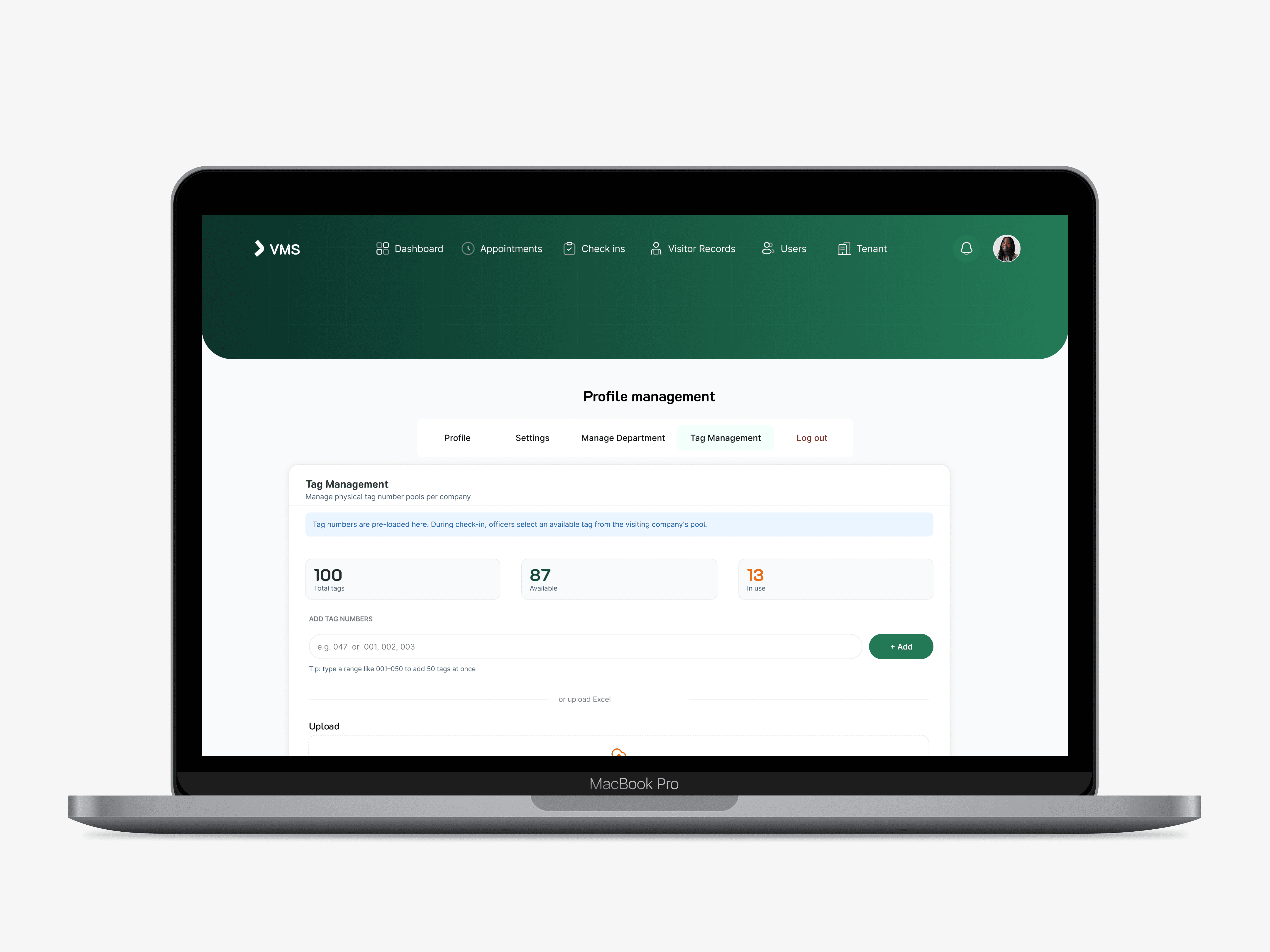
Tag Management: Physical badge assignment per tenant. Tags auto-filter by company in the check-in form to prevent cross-tenant allocation errors.

Design Decisions
Design Decisions
Design Decisions

Slide‑over forms: Security officers need split attention. The drawer keeps the dashboard visible while processing a new arrival, so the occupancy count is always in view.
Colour‑coded stat numbers: Orange for 'currently active', blue for 'completed', dark ink for totals. No charts: the numbers are the data. Fast decisions need no cognitive overhead.
Auto‑timestamp on check‑in: Removing manual time entry eliminates backdating risk and fatigue errors. The timestamp is shown but not editable.
Four appointment statuses: Pending, Honoured, Cancelled, and Completed, each carries a distinct meaning for audit trails and analytics. Two states would collapse an important operational signal.
Auto‑filtered Tag Number: Physical tags are shared infrastructure in multi‑tenant buildings. Filtering by the visitor's company prevents cross‑tenant tag allocation while keeping the backend logic hidden from the officer.
Designer Initiative
Reflection
Reflection
What worked well
The slide-over panel is the strongest interaction design choice in the product — it acknowledges the real operating context where multiple things demand attention simultaneously. The colour-coded stat cards communicate urgency hierarchy without any training. The Tag Number 'New' badge teaches through use rather than documentation.
What I'd push further
Mobile/tablet companion: Security officers don't always sit at a desk. A tablet-optimised check-in view at a gate would significantly extend deployment.
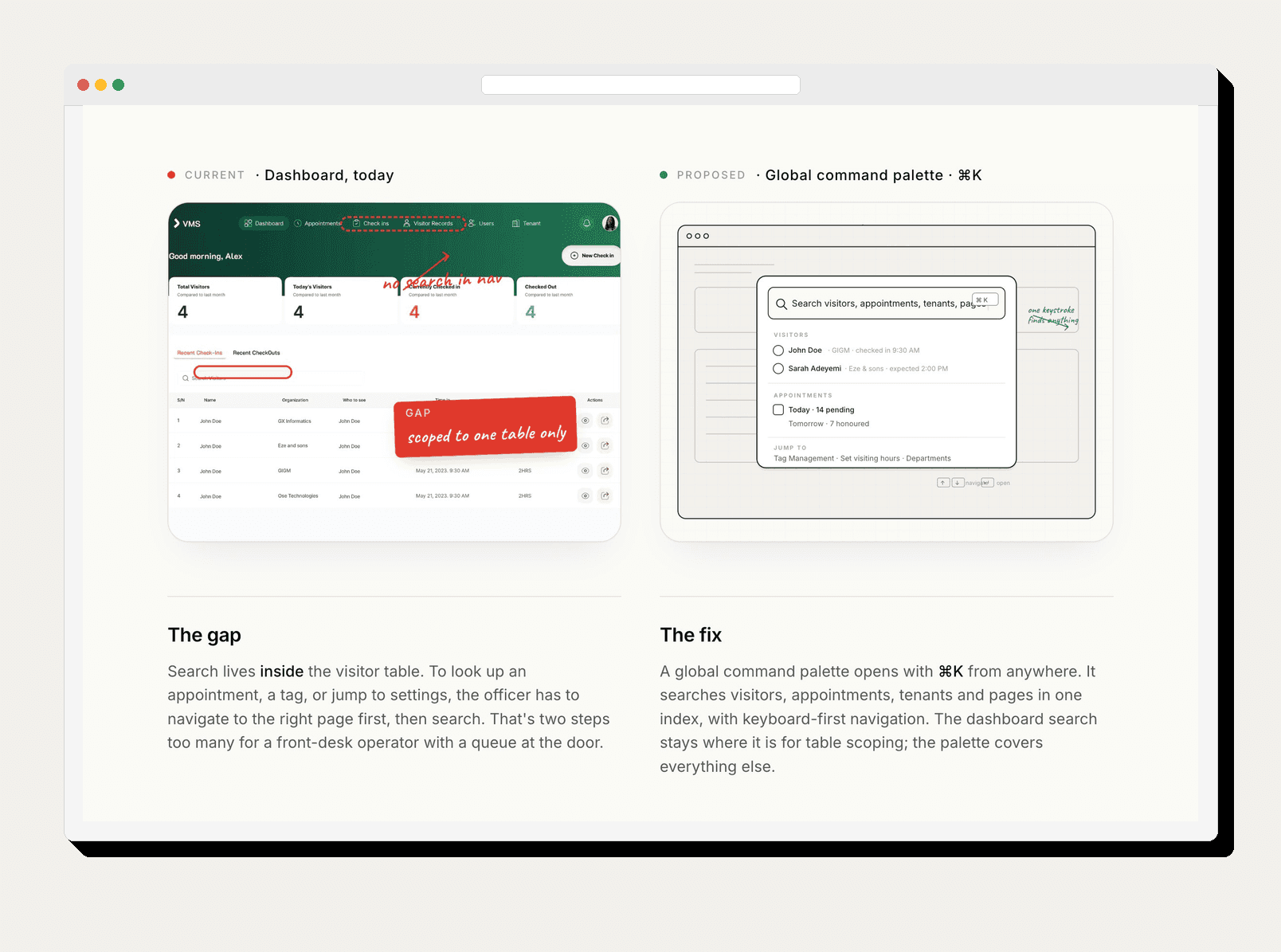
Global search: Each section has its own search. An officer looking up a visitor shouldn't need to know which section they're in first.
Self-service appointment flow: The biggest open question: how does a visitor initiate their own appointment? A pre-registration flow would reduce front-desk load and improve data quality.
Outcome
Impact
Impact
VMS replaced a paper-based process that had no accountability trail. The design gives security officers a system they can operate without training, and managers a live view of their facility at any moment.
What shipped
64 screens designed across 6 core flows
Full design system established: colour, type, components, spacing
Tag management feature added mid-project based on security team feedback
Handed off to development with annotated specs and component documentation
What's Next
What's Next
What's Next

The current build is a strong foundation. The next design sprint would focus on:
Self-service pre-registration: Visitors book their own visit before arriving, reducing front-desk load at peak hours
Mobile gate view: A tablet-optimised check-in interface for security officers working away from a fixed desk
Notification centre: Overstay alerts, appointment no-shows, and unexpected visitor flags surfaced in real time
Gallery
Gallery

Visitor Management System
A web-based platform for secure, real-time visitor tracking across multi-tenant government and corporate facilities.
Visitor Management System
A web-based platform for secure, real-time visitor tracking across multi-tenant government and corporate facilities.
Visitor Management System
A web-based platform for secure, real-time visitor tracking across multi-tenant government and corporate facilities.
Year
2025
Year
2025
Client
GX Informatics
Client
GX Informatics
Project type
GovTech · Product Design
Project type
GovTech · Product Design
Overview
Project Description
The Visitor Management System (VMS) is a web-based platform designed for facilities to track, manage, and audit visitor access. It handles the full visitor lifecycle, from pre-scheduled appointments through physical check-in, to check-out and historical reporting.
The system is designed for security officers, front-desk administrators, and facility managers working in multi-tenant buildings, government offices, and enterprise campuses. It replaces paper logbooks and fragmented spreadsheets with a unified, searchable, real-time platform.
The Problem
Security gaps in physical access
Most facilities in Nigeria's government and corporate sector still rely on paper-based visitor logs. These create compounding problems, illegible entries, no audit trail, no way to verify who is on-premises at any given moment, and zero accountability when something goes wrong.
Before VMS: Manual paper logs at reception. No record linkage to hosts. No time tracking. No way to flag overstays or unauthorized access. Appointment coordination done via phone calls and WhatsApp.
After VMS: Real-time dashboard showing who's checked in, who they're visiting, and how long they've been present. Pre-registered appointments. Tag-based physical access. Full audit log with date filtering.
The Solution
Solution
The VMS is organized around six primary sections: Dashboard, Check Ins, Appointments, Visitor Records, Users, and Tenant management.
Dashboard: Four real-time stat cards (Total Visitors, Today's Visitors, Currently Checked In, Checked Out) with a tabbed table showing Recent Check-Ins and Recent CheckOuts.
Check-In Form: A slide-over panel that layers over the dashboard so the officer never loses context. Captures: phone number, name, organization, address, laptop number (optional), whom to see, purpose of visit, department, office, tag number (auto-filtered by company), and signature. Time-in is auto-stamped, not editable.
Appointments Dashboard: Status-tracked table with four states: Pending (orange), Honoured (blue), Cancelled (red), Completed (green). Stat cards headline the screen with totals for each status.
Visitor Records: Full historical log with time-in, time-out, and time-spent columns. Date range picker and type filter for scoped queries without leaving the screen.
Tag Management: Physical badge assignment per tenant. Tags auto-filter by company in the check-in form to prevent cross-tenant allocation errors.
Design Decisions
Design Decisions
Design Decisions
Slide‑over forms: Security officers need split attention. The drawer keeps the dashboard visible while processing a new arrival, so the occupancy count is always in view.
Colour‑coded stat numbers: Orange for 'currently active', blue for 'completed', dark ink for totals. No charts: the numbers are the data. Fast decisions need no cognitive overhead.
Auto‑timestamp on check‑in: Removing manual time entry eliminates backdating risk and fatigue errors. The timestamp is shown but not editable.
Four appointment statuses: Pending, Honoured, Cancelled, and Completed, each carries a distinct meaning for audit trails and analytics. Two states would collapse an important operational signal.
Auto‑filtered Tag Number: Physical tags are shared infrastructure in multi‑tenant buildings. Filtering by the visitor's company prevents cross‑tenant tag allocation while keeping the backend logic hidden from the officer.
Designer Initiative
Reflection
Reflection
What worked well
The slide-over panel is the strongest interaction design choice in the product — it acknowledges the real operating context where multiple things demand attention simultaneously. The colour-coded stat cards communicate urgency hierarchy without any training. The Tag Number 'New' badge teaches through use rather than documentation.
What I'd push further
Mobile/tablet companion: Security officers don't always sit at a desk. A tablet-optimised check-in view at a gate would significantly extend deployment.
Global search: Each section has its own search. An officer looking up a visitor shouldn't need to know which section they're in first.
Self-service appointment flow: The biggest open question: how does a visitor initiate their own appointment? A pre-registration flow would reduce front-desk load and improve data quality.
Outcome
Impact
Impact
VMS replaced a paper-based process that had no accountability trail. The design gives security officers a system they can operate without training, and managers a live view of their facility at any moment.
What shipped
64 screens designed across 6 core flows
Full design system established: colour, type, components, spacing
Tag management feature added mid-project based on security team feedback
Handed off to development with annotated specs and component documentation
What's Next
What's Next
What's Next
The current build is a strong foundation. The next design sprint would focus on:
Self-service pre-registration: Visitors book their own visit before arriving, reducing front-desk load at peak hours
Mobile gate view: A tablet-optimised check-in interface for security officers working away from a fixed desk
Notification centre: Overstay alerts, appointment no-shows, and unexpected visitor flags surfaced in real time
Gallery
Gallery