Document Management System
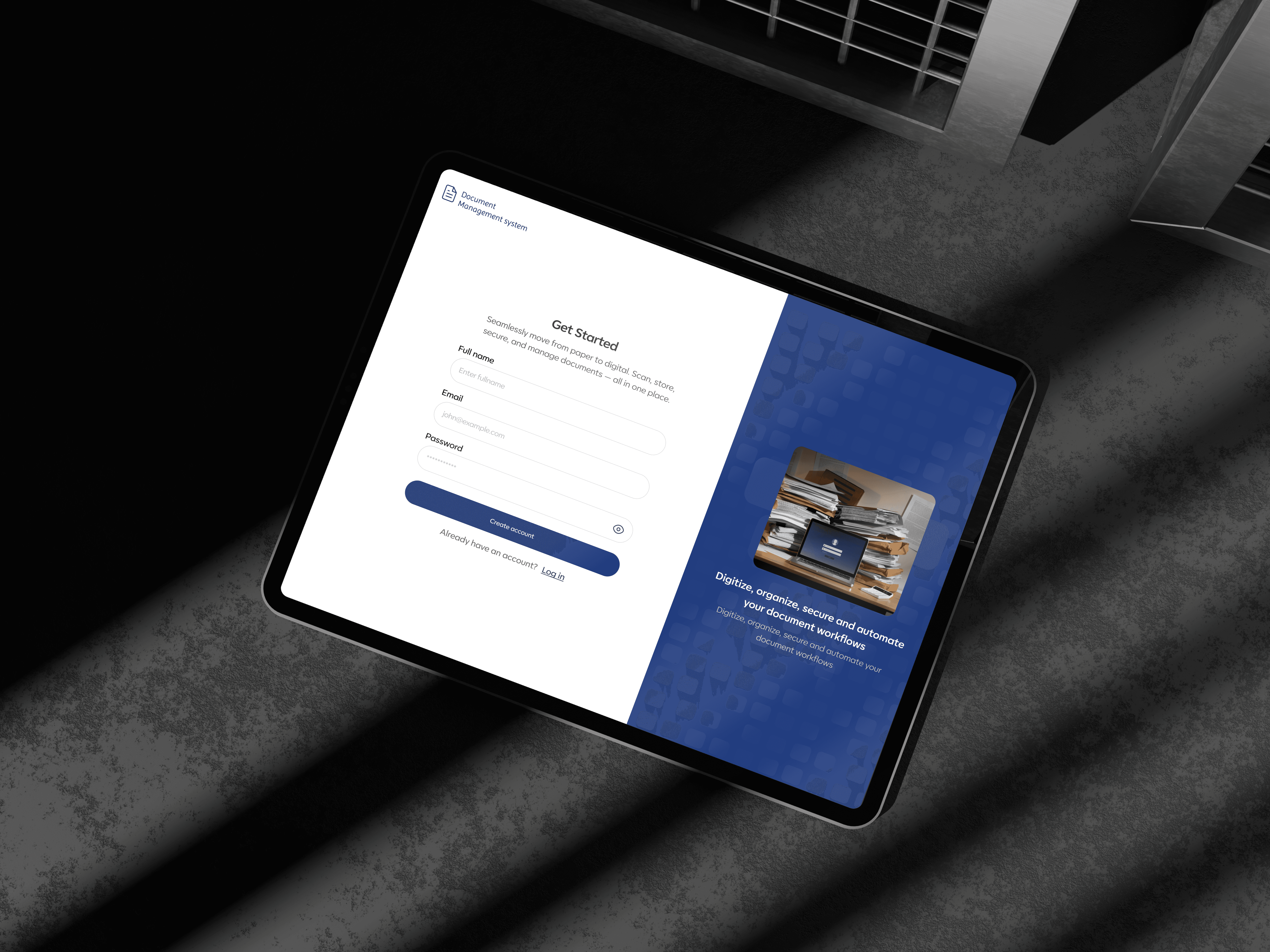
Most corporate offices in Nigeria still run on physical cabinets and shared drives. I designed EDMS, a system that handles how organizations store, organize, track, and retrieve digital documents, built for the way offices actually work.
Document Management System
Most corporate offices in Nigeria still run on physical cabinets and shared drives. I designed EDMS, a system that handles how organizations store, organize, track, and retrieve digital documents, built for the way offices actually work.
Document Management System
Most corporate offices in Nigeria still run on physical cabinets and shared drives. I designed EDMS, a system that handles how organizations store, organize, track, and retrieve digital documents, built for the way offices actually work.
Year
2025
Year
2025
Client
GX Informatics
Client
GX Informatics
Problem Statement
Problem Statement

They weren't mismanaging documents. They just had no system.
Nobody wakes up and decides to mismanage documents.
Cabinets become overcrowded.
Files get shared over WhatsApp because it’s faster.
A folder goes missing.
An office fire destroys years of records overnight.
That was the reality for most corporate offices I was designing for, where inefficient document handling wasn’t just an operational issue, but a growing risk to continuity, accountability, and trust.
Solution
The Solution
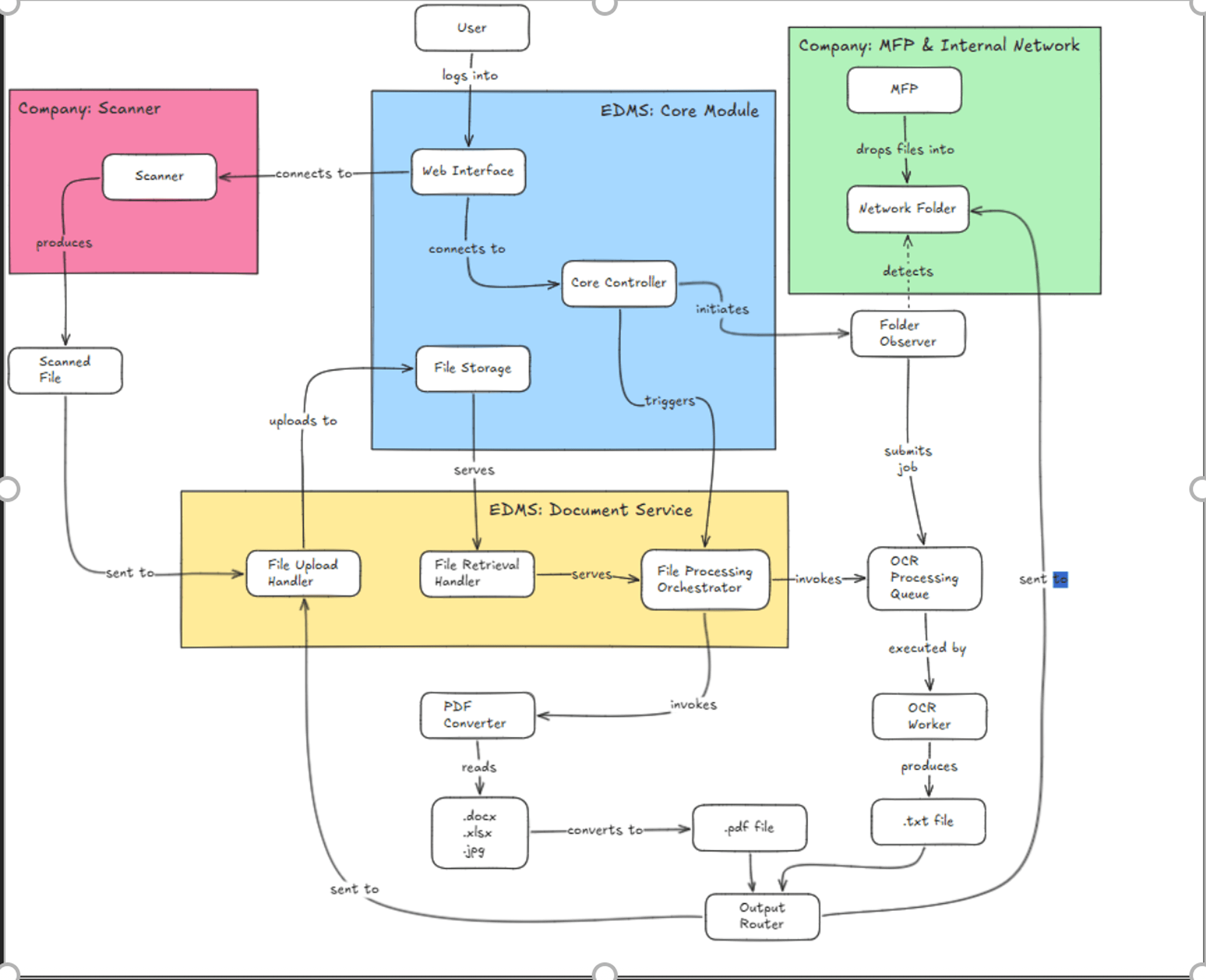
What happens to the thousands of documents already sitting inside physical cabinets?
Because if we built a powerful digital system while ignoring migration, adoption would fail.
Staff would still be trapped between paper records and digital workflows.
So I pushed for a two-phase approach.
First, make migration easy by introducing
Batch scanning with OCR allows teams to digitize large volumes of files without processing documents one at a time.
Then we structured the system around something familiar:
Department → Cabinet → Folder.
Instead of forcing users to relearn everything, the platform mirrored the mental models they already used in the physical world.
What I learned
Research & Insights
Speaking with stakeholders, I learned people weren't going to abandon the mental model they'd relied on for years. The folder structure we designed maps directly to what they already knew:
The goal was never to reinvent how they thought about documents. It was to make switching feel easy. Those sessions revealed that not everyone uses a system the same way. Auditors weren't interested in browsing. They wanted to search, find a file, and get out. So search became a first-class feature.
But the thing that almost killed adoption had nothing to do with the interface. It was the scanning process.
Scan the document. Extract the text. Upload the file. Three separate steps that nobody wanted to do fifty times a day.
We collapsed all of it into one action, and the biggest reason not to use the system was gone.

Design Decisions
Design decisions
Design decisions
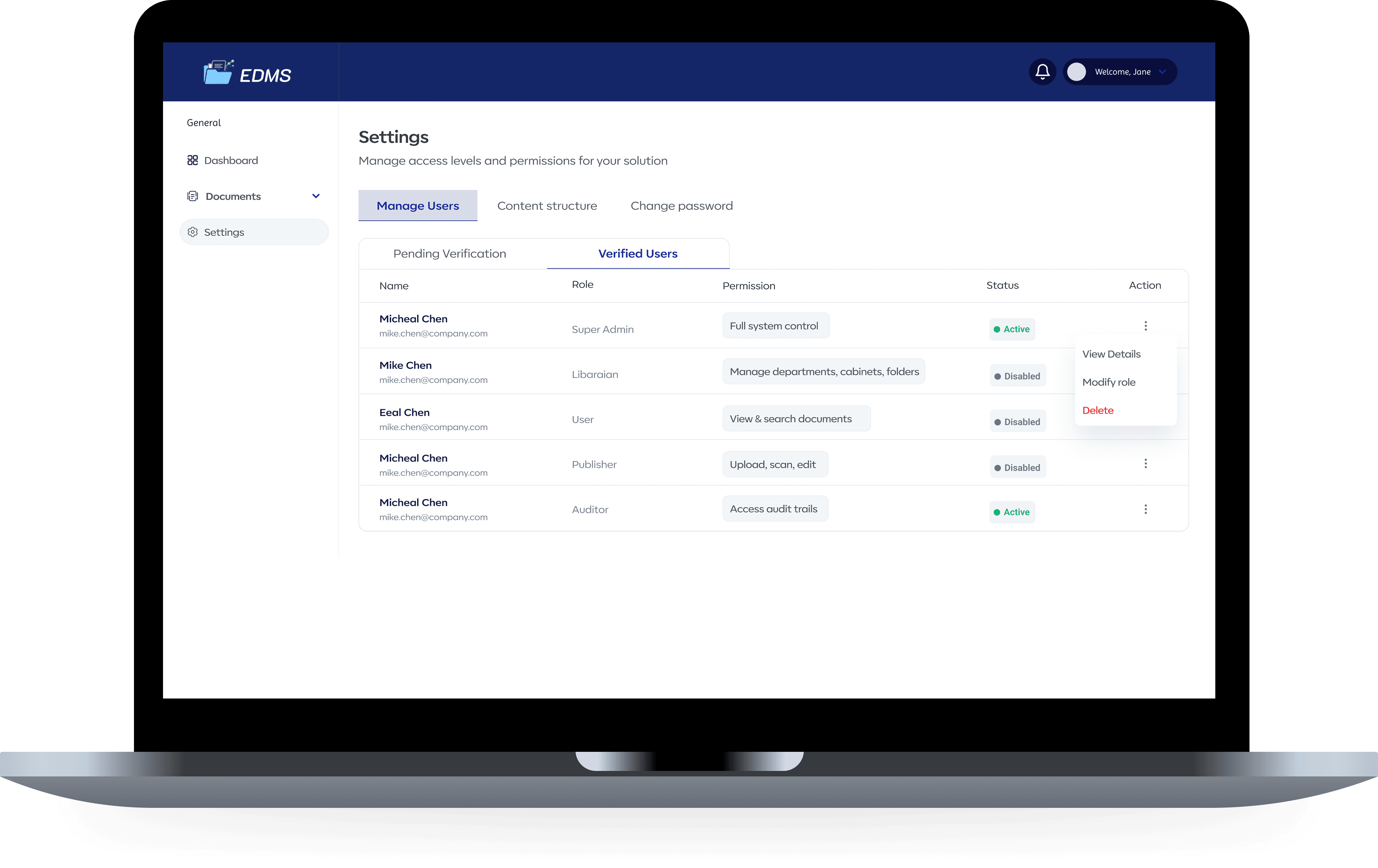
The system had three users:
A Publisher who creates and uploads
A Librarian who organizes and retrieves,
Admin who controls everything.
Give users too much access, and we recreate the exact problem we are trying to solve. Giving them too little, the system quietly fails through lack of use. Speaking with stakeholders helped to understand the process better We mapped it together:
who needs to see what, who needs to act on what, and where the boundaries had to sit.
Designer Initiative
Designer Initiative
Designer Initiative

OCR and batch scanning weren't in the scope, but I could see that without it, nobody was going to migrate thousands of physical documents into a new system. It would have been the reason adoption failed quietly. Collapsing scanning and text extraction into one action removed that barrier entirely.
I designed role-based access and batch PDF export. Making that a single action instead of a repetitive manual task saved real time for real people.
Outcome
Outcomes
Outcomes
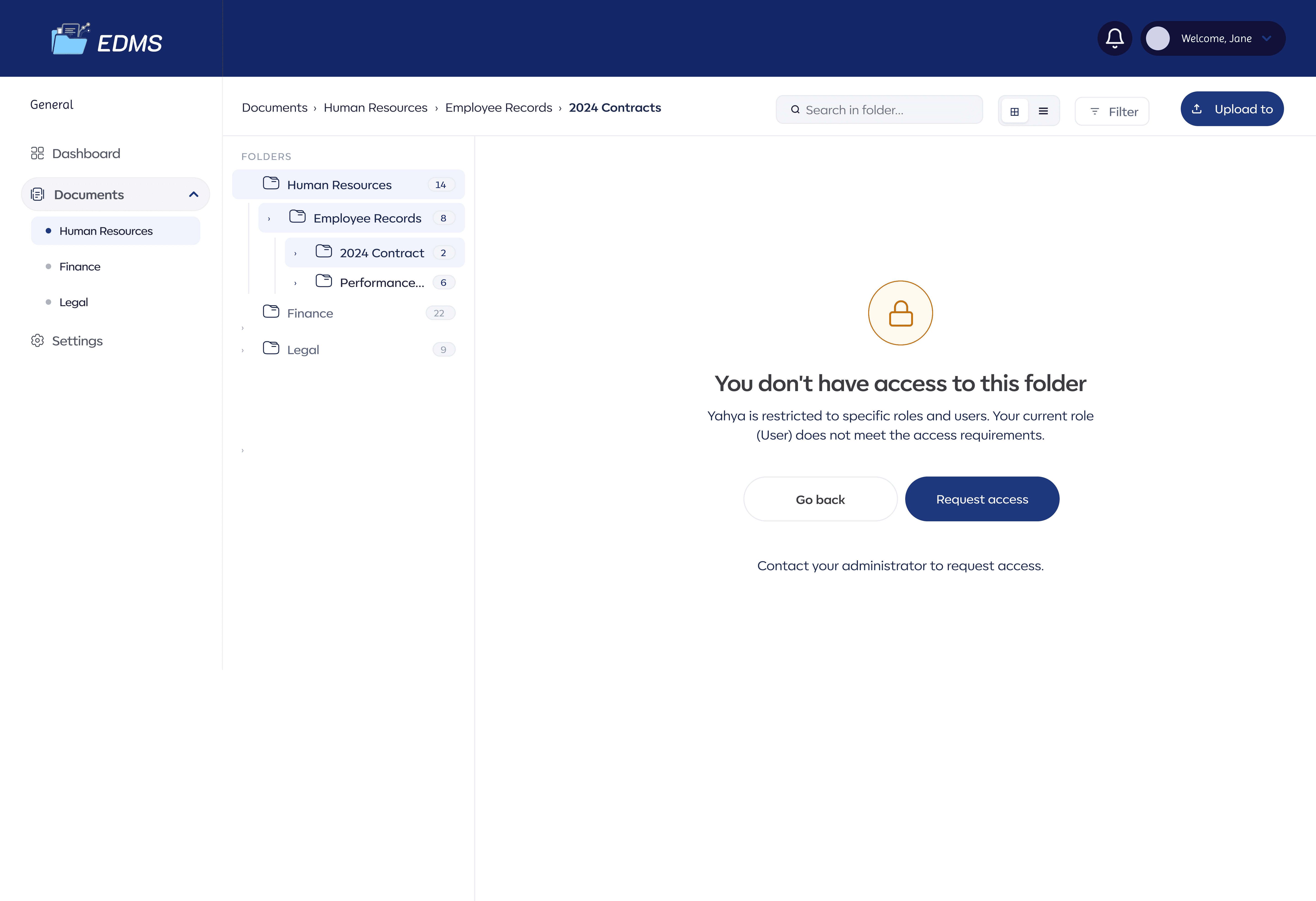
The system went live. Stakeholders described it as seamless, the best thing you can hear about a product like this. But an enhancement request was suggested to configure folder and file access by role and password. That only happens when a client has stopped thinking about the old way and started thinking entirely inside the system you designed. V2 is already taking shape, with granular folder permissions, AI-assisted document classification using the OCR foundation we built, and a dedicated audit trail dashboard for compliance reviews.
What's Next
What's Next
What's Next

The folder-level permissions request is first in line, it's the natural next layer of what we already built. After that, the OCR foundation opens up something more interesting. Instead of a Librarian manually tagging every file, the system could suggest categories based on extracted text. AI-assisted classification, built on work we've already done. We're also looking at a proper audit trail dashboard, not logs buried in settings, but a dedicated view that makes compliance reviews something you can actually do in under five minutes.
Gallery
Gallery


Document Management System
Most corporate offices in Nigeria still run on physical cabinets and shared drives. I designed EDMS, a system that handles how organizations store, organize, track, and retrieve digital documents, built for the way offices actually work.
Document Management System
Most corporate offices in Nigeria still run on physical cabinets and shared drives. I designed EDMS, a system that handles how organizations store, organize, track, and retrieve digital documents, built for the way offices actually work.
Document Management System
Most corporate offices in Nigeria still run on physical cabinets and shared drives. I designed EDMS, a system that handles how organizations store, organize, track, and retrieve digital documents, built for the way offices actually work.
Year
2025
Year
2025
Client
GX Informatics
Client
GX Informatics
Problem Statement
Problem Statement
They weren't mismanaging documents. They just had no system.
Nobody wakes up and decides to mismanage documents.
Cabinets become overcrowded.
Files get shared over WhatsApp because it’s faster.
A folder goes missing.
An office fire destroys years of records overnight.
That was the reality for most corporate offices I was designing for, where inefficient document handling wasn’t just an operational issue, but a growing risk to continuity, accountability, and trust.
Solution
The Solution
What happens to the thousands of documents already sitting inside physical cabinets?
Because if we built a powerful digital system while ignoring migration, adoption would fail.
Staff would still be trapped between paper records and digital workflows.
So I pushed for a two-phase approach.
First, make migration easy by introducing
Batch scanning with OCR allows teams to digitize large volumes of files without processing documents one at a time.
Then we structured the system around something familiar:
Department → Cabinet → Folder.
Instead of forcing users to relearn everything, the platform mirrored the mental models they already used in the physical world.
What I learned
Research & Insights
Speaking with stakeholders, I learned people weren't going to abandon the mental model they'd relied on for years. The folder structure we designed maps directly to what they already knew:
The goal was never to reinvent how they thought about documents. It was to make switching feel easy. Those sessions revealed that not everyone uses a system the same way. Auditors weren't interested in browsing. They wanted to search, find a file, and get out. So search became a first-class feature.
But the thing that almost killed adoption had nothing to do with the interface. It was the scanning process.
Scan the document. Extract the text. Upload the file. Three separate steps that nobody wanted to do fifty times a day.
We collapsed all of it into one action, and the biggest reason not to use the system was gone.
Design Decisions
Design decisions
Design decisions
The system had three users:
A Publisher who creates and uploads
A Librarian who organizes and retrieves,
Admin who controls everything.
Give users too much access, and we recreate the exact problem we are trying to solve. Giving them too little, the system quietly fails through lack of use. Speaking with stakeholders helped to understand the process better We mapped it together:
who needs to see what, who needs to act on what, and where the boundaries had to sit.
Designer Initiative
Designer Initiative
Designer Initiative
OCR and batch scanning weren't in the scope, but I could see that without it, nobody was going to migrate thousands of physical documents into a new system. It would have been the reason adoption failed quietly. Collapsing scanning and text extraction into one action removed that barrier entirely.
I designed role-based access and batch PDF export. Making that a single action instead of a repetitive manual task saved real time for real people.
Outcome
Outcomes
Outcomes
The system went live. Stakeholders described it as seamless, the best thing you can hear about a product like this. But an enhancement request was suggested to configure folder and file access by role and password. That only happens when a client has stopped thinking about the old way and started thinking entirely inside the system you designed. V2 is already taking shape, with granular folder permissions, AI-assisted document classification using the OCR foundation we built, and a dedicated audit trail dashboard for compliance reviews.
What's Next
What's Next
What's Next
The folder-level permissions request is first in line, it's the natural next layer of what we already built. After that, the OCR foundation opens up something more interesting. Instead of a Librarian manually tagging every file, the system could suggest categories based on extracted text. AI-assisted classification, built on work we've already done. We're also looking at a proper audit trail dashboard, not logs buried in settings, but a dedicated view that makes compliance reviews something you can actually do in under five minutes.
Gallery
Gallery